Describe an options strategy.Backtest it on minute data.Trade it live.
The built-in AI agent writes the strategy from a plain-English description. The engine backtests it across 6 US index and ETF underlyings, with slippage and commissions modeled, then trades it live through your Interactive Brokers account.
No account, no card · SPX options up to seven days from expiry
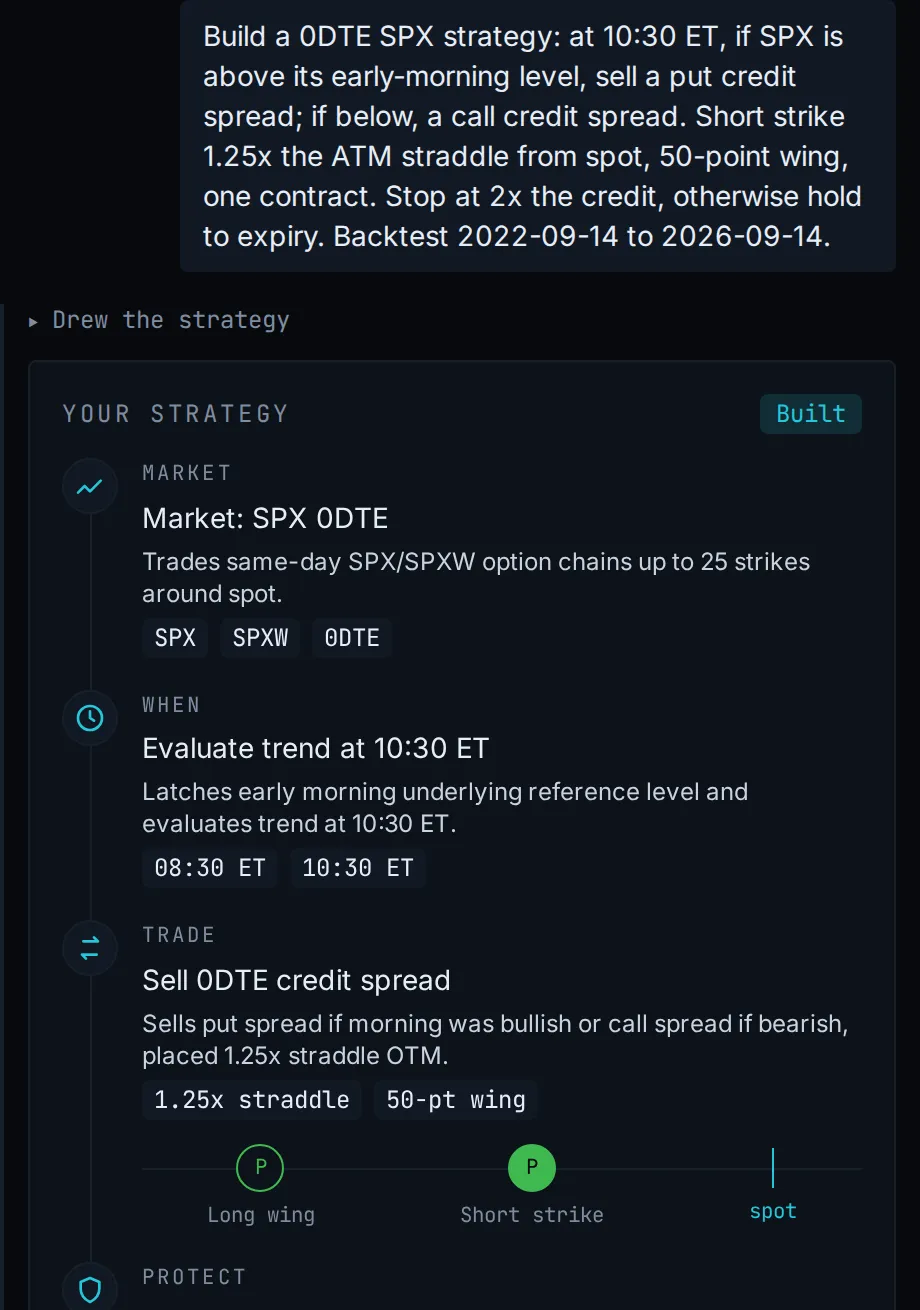
The backtestsame sessionXavi draws it
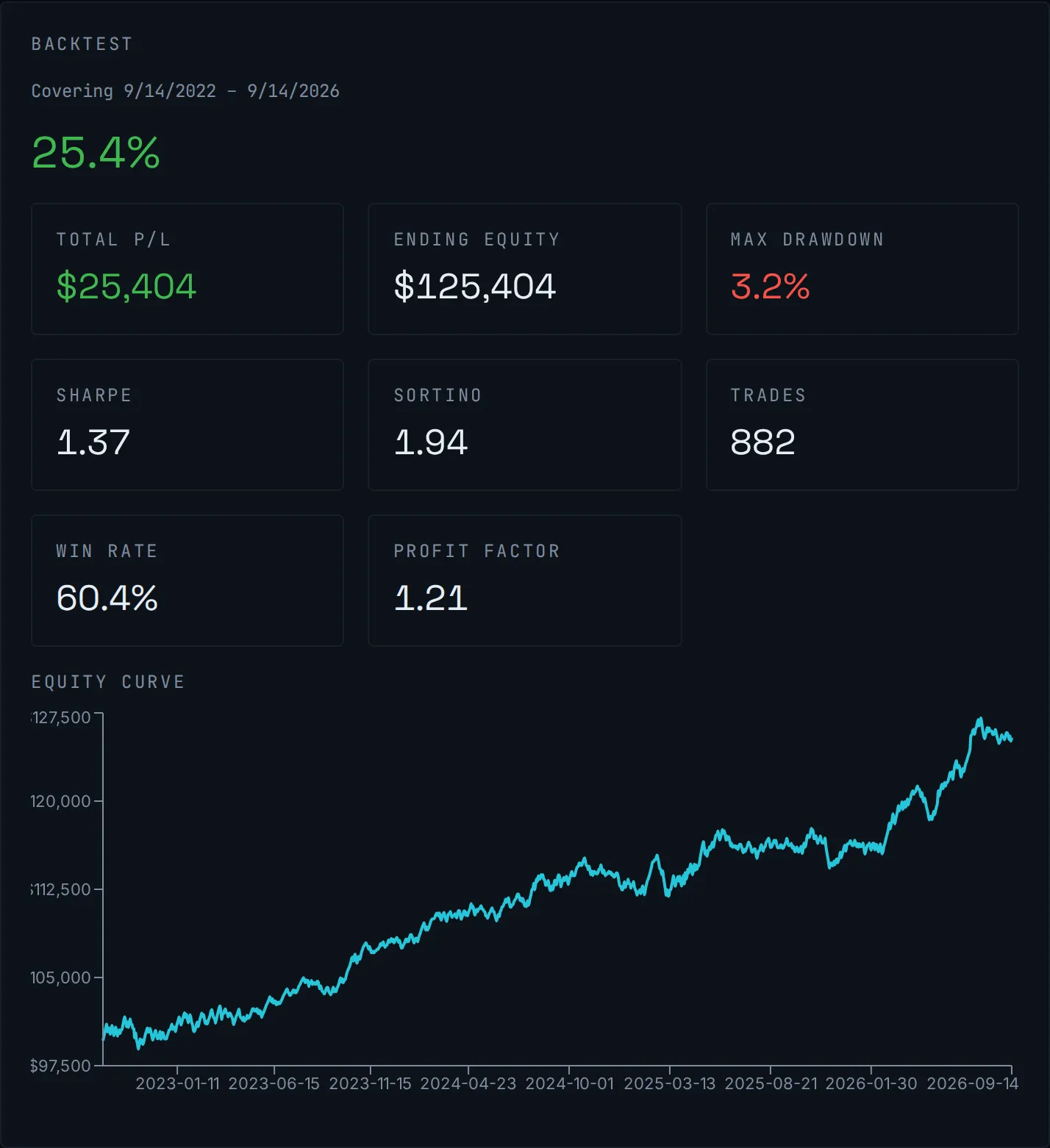
Xavi's drawing of a real strategy, and that strategy's backtest on historical SPX data. Simulated results, not a track record.
✓The AI writes and backtests. It can never place a live order.
✓Build and backtest in your browser. No broker needed.
✓Run it on your broker's paper account before you go live.
✓14 days, no card. The trial ends by itself unless you subscribe.
The problem
Your rules never panic. You do.
// Trading by hand
On paper the strategy is mechanical: these strikes, this credit, that stop. Live, it runs through you, so you hesitate on the entry, snatch the winner early out of fear, widen the stop to avoid being wrong, sit out the next trade after a red day. Every flinch is a fresh place for real results to drift from the plan you actually tested.
// StratVerra engine
StratVerra trades the rules exactly as written: the same entries, the same stops, and the same code path that ran the backtest. It does not get scared, second-guess the rules or have a bad day, so the strategy you validated is the strategy that fills.
How it works
From options idea to live fill, in three steps.
01
Build
Tell the AI agent what you want in plain English, or compose it from blocks. Neither way needs code.
Agent-authored strategies
Ask Xavi, the AI agent built into the app. It writes and backtests real custom strategies on your account. Or connect the assistant you already use, like Claude or ChatGPT, and it does the same work. Neither one can ever place a live order.
Composable strategy builder
Rather build it yourself? Compose When / If / Enter / Exit blocks into an entry-and-exit rule, or open what the agent wrote and change it, without writing code.
Reproducible strategies
Strategies are versioned. The same inputs give the same result, every run.
02
Backtest
Run it on real minute data, with slippage and commissions included.
Minute-level SPX chains, and 5 more
SPX, XSP, RUT, SPY, QQQ, IWM: full option chains at minute resolution, hosted and included. Your backtests and your agent both run on this data.
Modeled fills
Bid/ask or mid slippage and per-contract commission, applied at run time and kept out of the strategy itself.
0DTE and multi-day options
Same settlement path for same-day and DTE ≥ 0 positions. 0DTE is just the DTE = 0 case.
03
Go live
Trade the same strategy through your own broker. Paper first, then live.
One code path
The engine that backtests your strategy is the engine that trades it live, so test and live cannot drift apart.
Four supported brokers
Orders route to Interactive Brokers, MEXEM, LYNX or Easybroker over the native TWS API. They are placed by the engine, not queued for you to send. Paper first, then live.
Cloud backtests, local execution
Backtests run on hosted option data, so you have no data to prepare and nothing to run locally. Live orders are placed by the app on your machine, straight to your own broker gateway.
Build and backtest in your browser. Install the desktop app only when you're ready to connect a broker for paper or live execution.
Fills are where a backtest is usually wrong. Read exactly how ours are modelled, including what the simulation deliberately does not model.
Trading through MEXEM, LYNX or Easybroker? See how each broker connects, and why all four reach the market the same way.
Strategy examples
Ask in a sentence. Get a working options strategy.
Two things people asked the agent for, and what it came back with. Both land in your library beside the strategies you built by hand. Every strike, time and stop it chose is a setting you can read and change yourself.
0DTE iron condor
You asked
“Sell an iron condor on SPX every morning, but skip the days the market is trending hard.”
Your agent built
1Condor legs picked near 15 delta, 25 points wide
2Opens at 10:00 ET, only when the 14-period RSI sits between 40 and 60
3Takes profit at half the credit, stops at twice it
0DTE opening breakout
You asked
“If SPX breaks out of its opening range with conviction, buy the move with defined risk.”
Your agent built
1Marks the high and low of the first 30 minutes
2Break upward buys a call debit spread, downward a put, with MACD confirming
Open a finished run and you get the settings it ran with, the numbers, the charts, and then every fill and every round-trip trade in tables you can scroll.
The numbers first
The page opens on the headline metrics, over the equity curve they came from:
Total P/L
Ending equity
Max drawdown
Sharpe
Sortino
Trades
Win rate
Profit factor
Equity curvebacktest
Then where the risk was
The strike map draws every leg at its strike, for exactly as long as it was open, over the underlying's price that session. Solid lines are the shorts you carry the risk on; dashed are the long wings.
Step through the run a day at a time and you can see whether price ever came near a short, or whether the trade only looked safe in the P/L column.
Strike mapone session
Put shortPut longCall shortCall longSPX spot
Illustrative, not a track record
Pricing
One price. Every feature.
There is one plan and no tiers to compare. Everything below is included.
$49/mo
or $490/yr, billed annually (save $98)
Tax included: VAT or local sales tax. Nothing is added at checkout.
✓Live execution on IBKR, MEXEM, LYNX or Easybroker
✓One engine: what you backtest is what you trade live
✓Modeled fills: bid/ask or mid slippage + commissions
Introductory price, subject to change.
FAQ
Answers before you start.
Something not covered here? Ask us. A person reads every message.
What is StratVerra?
StratVerra is an options backtesting app with a built-in AI agent, Xavi. You describe a strategy in plain English, Xavi writes it, and the engine backtests it on minute-level option chains for SPX, XSP, RUT, SPY, QQQ and IWM, with slippage, commissions and Reg-T margin modeled. The same engine can then trade it live through your own Interactive Brokers account.
Can an AI agent build strategies for me?
Yes. It is how most people build one. There is an AI agent built into the app called Xavi, and you can connect the assistant you already use (Claude, ChatGPT and others) to your account instead. Either one writes a custom strategy, backtests it, reads the results back and fixes what didn't work. Xavi signs in as you, the strategies land in your library, and neither is ever able to place a live order.
Do I need to write code?
No, and you don't have to build the strategy yourself either. Describe what you want and the built-in AI agent (or your own) writes a custom strategy for you. If you'd rather do it by hand, strategies are also built from composable blocks in the app, and anything the agent writes can be opened and changed there.
Do I need a broker account?
Only for live trading. Backtests run on the hosted option data included with your subscription, so you can build and test a strategy before you ever connect a broker.
Do I need to install anything?
Build and backtest in your browser. Install the desktop app only when you're ready to connect a broker for paper or live execution. The free trial needs nothing installed: you sign in, build a strategy and run backtests in the browser. The desktop app is free, and it is the step you take when you want the engine placing real orders through your own broker gateway.
Which brokers can I trade through?
Interactive Brokers, MEXEM, LYNX and Easybroker. The last three are Introducing Brokers to Interactive Brokers: your account is with them, the trades clear at IBKR, and the software they give you is IBKR's Trader Workstation or Gateway under their branding. So all four connect the same way, over the same API.
What market data does it use?
Minute-level option chains on SPX, XSP, RUT, SPY, QQQ and IWM, hosted and included with your subscription. There is nothing to buy separately and nothing to download. The app shows you exactly which dates are available for each one when you set up a backtest.
What are the terms of the free trial?
Fourteen days, and it takes no card at all. Sign in at the browser app and start the trial from there. There is no payment page and nothing to enter. If you do nothing it simply ends: with no card on file there is nothing to charge and nothing to remember to cancel. To carry on, add a payment method before day 14. There is one free trial per account, so if you have subscribed before, a new subscription starts billing straight away. The listed price includes VAT: $49 a month is the amount actually charged, wherever you are.
What happens when I run out of AI?
Your plan includes a fair-use AI allowance that resets at the start of every month. If you use it up, you can add another month's worth for $9 at any time, from inside the app. It is added straight away and it never expires, so anything you don't use carries over.
Where does my strategy actually run?
Backtests run in the cloud on hosted data. Live trading runs on your machine: the app starts the engine locally and connects to your own broker gateway, so your orders go straight from you to your broker.
Which markets are supported?
US index and ETF options: SPX, XSP, RUT settle in cash at expiry, and SPY, QQQ, IWM are American-style, so a short leg can be assigned early. All 6 run across 0DTE and multi-day expirations. The engine itself is built broker- and market-agnostic.
Is this financial advice?
No. StratVerra is software for building and running your own strategies. It is not investment advice and does not manage money.
Ready when you are
Start your 14-day free trial
You need no installer and no card. The trial unlocks every feature, including unlimited cloud backtests. Then it's $49/mo or $490/yr, VAT included.
We measure site use and which ad brought you here, linked to your account if you sign up. See our privacy policy. Reject leaves a cookieless count only.