Describe an options strategy.Backtest it on minute data.Trade it live.
Xavi, the built-in AI agent, writes the strategy from a plain-English description. The engine backtests it across 6 US index and ETF underlyings, with slippage and commissions modeled, then trades it live through your Interactive Brokers account.
No account, no card. The preview tests SPX options up to seven days from expiry, over the last six months, and runs three backtests.
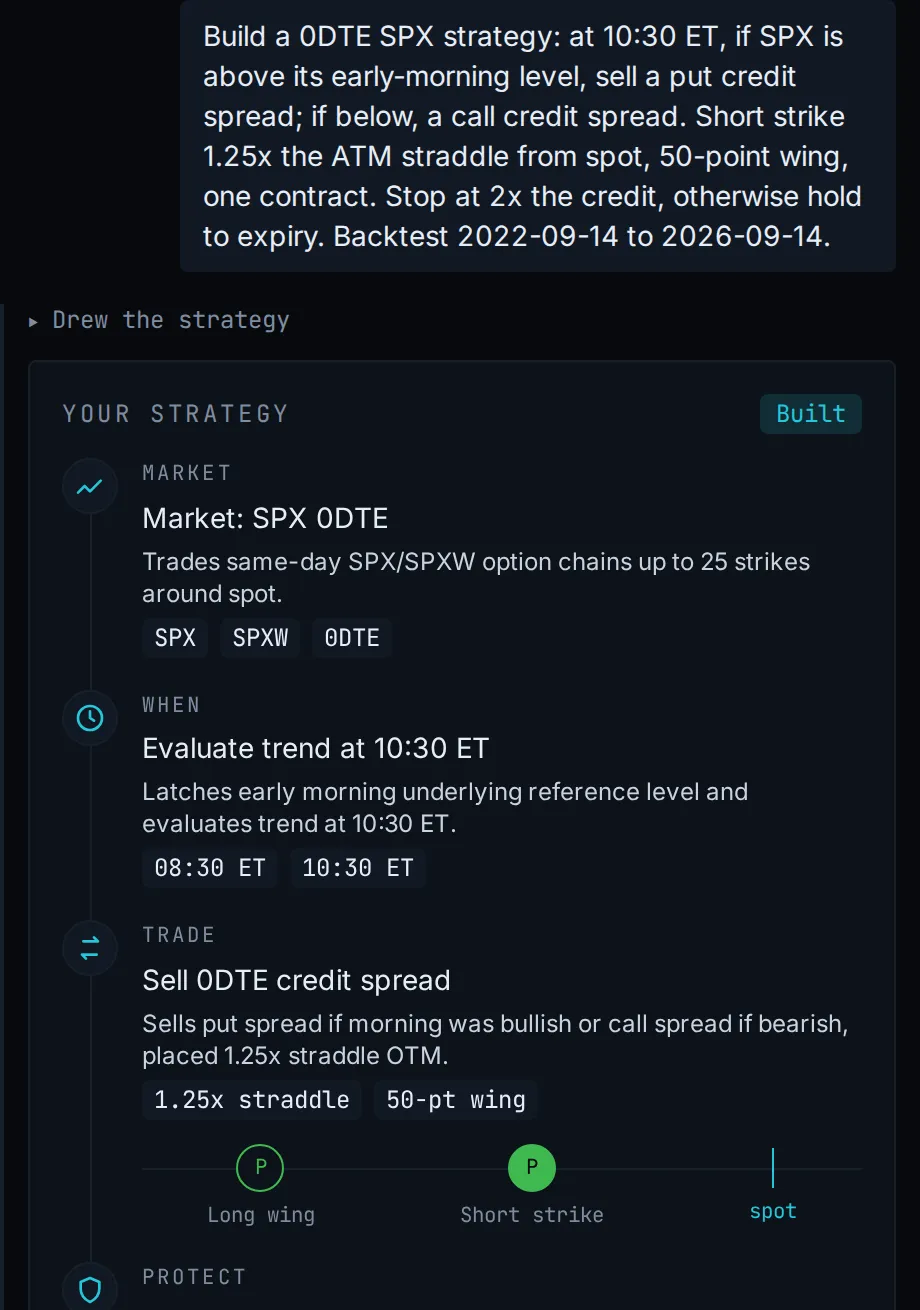
Xavi draws itfrom one real conversation
Its backtest on SPX, 2022-09-14 to 2026-09-14
Total return
25.4%
5.8% a year
Max drawdown
3.2%
Trades
882
Xavi's drawing of a real strategy, and that strategy's backtest on historical SPX data. Simulated results, not a track record.
The AI writes and backtests. It can never place a live order.
Build and backtest in your browser. No broker needed.
Run it on your broker's paper account before you go live.
14 days, no card. The trial ends by itself unless you subscribe.
Your rules never panic. You do.
An example day: the plan as StratVerra trades it, and the same day traded by hand
On StratVerra. 10:30 ET: Enter; 15:45 ET: Close; 10:30 to 15:45 ET
By hand. 10:52 ET: Enter late; 13:10 ET: Close early; 10:52 to 13:10 ET
On StratVerra
10:30 Enter
15:45 Close
By hand
10:52 Enter late
13:10 Close early
09:30
11:00
12:00
13:00
14:00
15:00
16:00
An example day, ET. Not a record of a trade.
By hand, the plan runs through you
You hesitate on the entry, snatch the winner early out of fear, widen the stop to avoid being wrong, sit out the next trade after a red day. Every flinch is a new place for real results to drift from the plan you actually tested.
The engine runs the rules as written
The same entries and the same stops, run by the same engine that ran the backtest. It does not get scared or have a bad day, so the strategy you validated is the strategy that fills.
From options idea to live fill, in three steps.
Build
Tell the AI agent what you want in plain English, or compose it from blocks. Neither way needs code.
Backtest
Run it on real minute data, with slippage and commissions included.
Go live
Trade the same strategy through your own broker, paper first, then live. The app on your machine places the orders, so it stays open while a strategy trades.
What each step includes
Build
Agent-authored strategies
Ask Xavi, the AI agent built into the app. It writes and backtests real custom strategies on your account. Or connect the assistant you already use, like Claude or ChatGPT, and it does the same work. Neither one can ever place a live order.
Composable strategy builder
Rather build it yourself? Compose When / If / Enter / Exit blocks into an entry-and-exit rule, or open what the agent wrote and change it, without writing code.
Reproducible strategies
Strategies are versioned. The same inputs give the same result, every run.
Backtest
Minute-level SPX chains, and 5 more
SPX, XSP, RUT, SPY, QQQ, IWM: full option chains at minute resolution, hosted and included. Your backtests and your agent both run on this data.
Modeled fills
Bid/ask or mid slippage and per-contract commission, applied at run time and kept out of the strategy itself.
0DTE and multi-day options
Same-day and longer-dated positions settle by the same rules, so a 0DTE strategy and a weekly one are tested the same way.
Go live
One engine
The engine that backtests your strategy is the engine that trades it live, so test and live cannot drift apart.
Four supported brokers
Orders route to Interactive Brokers, MEXEM, LYNX or Easybroker through your own broker gateway. They are placed by the engine, not queued for you to send. Paper first, then live.
Cloud backtests, local execution
Backtests run on hosted option data, so you have no data to prepare and nothing to run locally. Live orders are placed by the app on your machine, straight to your own broker gateway.
Build and backtest in your browser. Install the desktop app only when you're ready to connect a broker for paper or live execution.
Open a finished run and you get the settings it ran with, the numbers, the charts, and then every fill and every round-trip trade in tables you can scroll.
The numbers first
The page opens on the headline metrics, over the equity curve they came from. These are the backtest from the top of this page, SPX from 2022-09-14 to 2026-09-14:
Total P/L
$25,404
Ending equity
$125,404
Max drawdown
3.2%
Sharpe
1.37
Sortino
1.94
Trades
882
Win rate
60.4%
Profit factor
1.21
That is 5.8% a year. The fills used the Slippage model, so $13,408 of slippage and $1,599 of commissions are already taken out.
Equity curveSPX, 2022-09-14 to 2026-09-14
Equity curve of the hero's backtest: SPX, 2022-09-14 to 2026-09-14, from $100,000 to $125,404, with a maximum drawdown of 3.2%.
$125,404$100,000 start
Drawdownmax 3.2%
2023202420252026
Then where the risk was
The strike map draws every leg at its strike, for exactly as long as it was open, over the underlying's price that session. Solid lines are the shorts you carry the risk on; dashed are the long wings.
Step through the run a day at a time and you can see whether price ever came near a short, or whether the trade only looked safe in the P/L column. This is its last day, the one the page opens on: a 7,575/7,525 put spread opened at 10:31 ET and held to expiry, its short strike 18 points under the day's low.
Strike mapSPX, 14 Sep 2026, +$306
Strike map of the hero backtest on 2026-09-14: Short 7,575 put from 10:31 to 16:00 ET; Long 7,525 put from 10:31 to 16:00 ET. SPX traded between 7,593.29 and 7,647.92 and closed at 7,619.77.
SPX spotPut shortPut long
7,5757,525Opened 10:31
09:30
11:00
12:00
13:00
14:00
15:00
16:00
Simulated results, not a track record.
Free for 14 days. Then subscribe, or pay as you go.
Every account starts with the same trial: every feature, live trading included. When it ends, keep the subscription if you trade live, or buy credits as you use them.
14 days · No card required to start · Ends by itself
Subscription
To trade live, and backtest without counting.
$49/mo
or $490/yr, billed annually (save $98)
Tax included: VAT or local sales tax. Nothing is added at checkout.
Included
Unlimited cloud backtests
Live trading on IBKR, MEXEM, LYNX or Easybroker
AI allowance of 100 credits a month, about 50 messages
Minute-level chains: SPX, XSP, RUT, SPY, QQQ, IWM
Pay as you go
To research and backtest, paying per use.
$9 for 100 credits
Enough for 10 backtests, or any mix of backtests and AI.
Tax included.
What credits pay for
A backtest uses 10 credits
A typical AI message uses about 2
The same data, strategy builder and AI agent
Credits never expire
Live trading needs the subscription.
Introductory prices, subject to change.
Answers before you start.
Something not covered here? Ask us. A person reads every message.
What is StratVerra?
StratVerra is an options backtesting app with a built-in AI agent, Xavi. You describe a strategy in plain English, Xavi writes it, and the engine backtests it on minute-level option chains for SPX, XSP, RUT, SPY, QQQ and IWM, with slippage, commissions and Reg-T margin modeled. The same engine can then trade it live through your own Interactive Brokers account.
Can an AI agent build strategies for me?
Yes. It is how most people build one. There is an AI agent built into the app called Xavi, and you can connect the assistant you already use (Claude, ChatGPT and others) to your account instead. Either one writes a custom strategy, backtests it, reads the results back and fixes what didn't work. Xavi signs in as you, the strategies land in your library, and neither is ever able to place a live order.
Do I need to write code?
No, and you don't have to build the strategy yourself either. Describe what you want and the built-in AI agent (or your own) writes a custom strategy for you. If you'd rather do it by hand, strategies are also built from composable blocks in the app, and anything the agent writes can be opened and changed there.
Do I need a broker account, or to install anything?
Not to try it. Backtests run on hosted option data, so you can build and test a strategy before you ever connect a broker. Build and backtest in your browser. Install the desktop app only when you're ready to connect a broker for paper or live execution. The free trial needs nothing installed: you sign in, build a strategy and run backtests in the browser. The desktop app is free, and it is the step you take when you want the engine placing real orders through your own broker gateway.
Which brokers can I trade through?
Interactive Brokers, MEXEM, LYNX and Easybroker. The last three are Introducing Brokers to Interactive Brokers: your account is with them, the trades clear at IBKR, and the software they give you is IBKR's Trader Workstation or Gateway under their branding. So all four connect the same way, over the same API.
Does my computer have to stay on while a strategy trades live?
Yes. Live trading runs in the desktop app on your computer, not in the cloud, so the app has to stay open and the computer awake while a strategy trades. If you close the app during a run, it asks whether to keep your open positions or close them. Either way it cancels the run's working orders, including any stop-loss resting at your broker, so a position you keep is no longer watched. If the connection to your broker drops, the run stops and tries to close its positions at market, and it does not restart by itself. You log in to your broker in its own Trader Workstation or Gateway: StratVerra never sees that password, and saves only the connection details to your account.
What are the terms of the free trial?
Fourteen days, and it takes no card at all. Sign in at the browser app and start the trial from there. There is no payment page and nothing to enter. If you do nothing it simply ends: with no card on file there is nothing to charge and nothing to remember to cancel. To carry on, add a payment method before day 14. There is one free trial per account, so if you have subscribed before, a new subscription starts billing straight away. The listed price includes VAT: $49 a month is the amount actually charged, wherever you are.
What happens when I run out of AI?
Your plan includes 100 credits of AI a month, about 50 typical messages, and the allowance resets at the start of every month. If you use it up, you can buy 100 credits for $9 at any time, from inside the app. They are added straight away and never expire, so anything you don't use carries over.
Can I pay as I go instead of subscribing?
Yes. Every account starts with the free trial, and when it ends you can buy credits in the app instead of subscribing: $9 for 100 credits, tax included. A backtest uses 10 credits and a typical AI message about 2. Credits never expire. Live trading needs the plan.
Is this financial advice?
No. StratVerra is software for building and running your own strategies. It is not investment advice and does not manage money.
Start your 14-day free trial
Every feature, live trading included. No card and nothing to install.
Day 1 build and backtestDay 14 ends by itselfpaper or live through your broker, any day
We measure site use and which ad brought you here, linked to your account if you sign up. See our privacy policy. Reject leaves a cookieless count only.